The UCSB Learn Module is a configurable, filterable catalog of learning resources that allows for presentations, webinars, workshops, micro-learnings, and self-paced trainings to be included.
The UCSB Learn Module is a configurable, filterable catalog of learning resources that allows for presentations, webinars, workshops, micro-learnings, and self-paced trainings to be included.
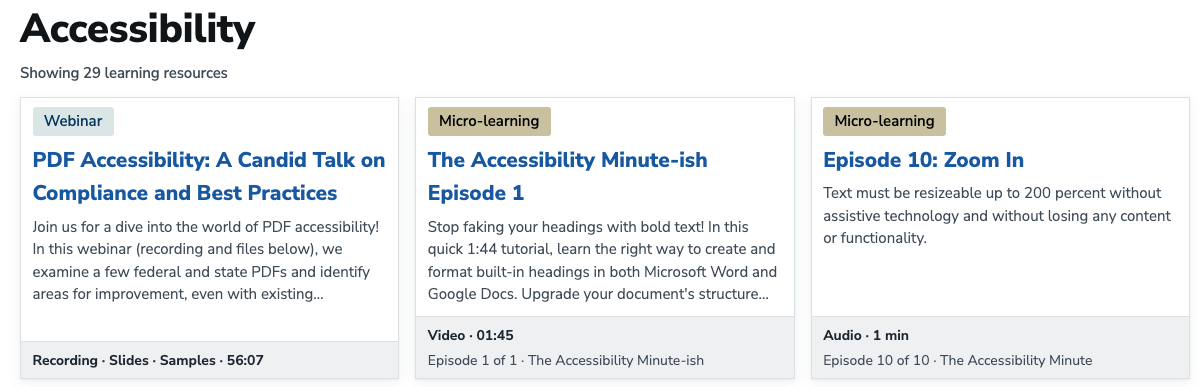
The UCSB IT website using the Learn module.
Extend > UCSB > UCSB Learn > Enable > Save
or use Drush:
drush pm:enable ucsb_learn
Installing creates the content types, vocabulary, media type, catalog view, roles, permissions, and Pathauto patterns. If /training is taken the catalog goes to /training-catalog; if both are taken, installation is blocked.
Configuration > Content authoring (/admin/config/content/ucsb-learn) sets the catalog name (default Training & Development) and base path (default /training). The form lists every catalog, series, format, and topic page URL for menu links, and toggles whether format and topic pages reach the XML sitemap; the other pages always do.
Changing the base path moves the routes and regenerates the module's URL aliases. A path another page or alias already uses is refused. Review existing redirects and hand-made aliases afterwards.
Two roles are assigned at Administration > People:
Both get the admin toolbar and can set URL aliases and sitemap options. Adding a page to a menu needs the site's menu permissions.
Both also hold View any unpublished content, which content_moderation needs for reviewing another editor's draft and for the series ordering form. It is site-wide, covering every unpublished entity rather than just this catalog; remove it if that is too broad, and its holders will see only their own drafts.
The examples below use the default /training catalog path. Changing the configured base path changes the corresponding public URLs.
| Path | Content |
|---|---|
/training |
Catalog with keyword, format, and topic filters |
/training/format/{format} |
All resources of one learning format |
/training/topic/{topic} |
All resources tagged with one topic |
/training/{resource} |
Learning resource detail page |
/training/{resource}/player |
Self-paced package player; unavailable for other learning types |
/training/{resource}/transcript.txt |
Plain-text transcript download when a transcript is available |
/training/series |
Series listing |
/training/series/{series} |
Series page with its ordered learning resources |
A Browse by series section sits above the resource results, hidden while a filter is active. Filter options appear only when published resources match them, and an empty catalog shows a notice instead.
Every format and topic gets its own page: formats from the learning type field's allowed values, topics from the Learning topics vocabulary. The slug is the name lowercased with punctuation collapsed to dashes, as in /training/format/micro-learning, and two topics cannot share one. A resource links to its format page from the breadcrumb and to topic pages from its topic tags.
Filtering and paging both happen in place, so the catalog URL carries neither, and these listing pages are the linkable form. The format, topic, and series pages page through ordinary links, so their page numbers are linkable. The catalog shows 30 resources per page and the series listing 24; paging moves focus to the new results and announces the position.
An optional Learning series cards block places the same series-card display on other pages.
Select the Learning type first: it determines which sections and fields appear. The types are Presentation, Webinar, Workshop, Micro-learning, Self-paced training, and Other.
Type-specific validation:
/sites/default/files/public_trainings/example/index.html.Captions come from the video platform and are required; a separate transcript is supported and recommended.
Paste the standard viewer URL for remote videos; Panopto/GauchoCast, YouTube, and Vimeo URLs are normalized for display, and a YouTube URL with a list parameter is treated as a playlist.
Audio and supporting documents come from the Media Library. Transcripts and package ZIPs use their own file fields.
A resource's Series field holds its series and Series weight its position. Newly assigned resources go to the end.
The Learning resource order section on the series edit form drags resources into order, edits or views one, and removes one from the series without deleting it. Previous, next, and Up next navigation follow that order.
A resource shows its series only to visitors who can view it, so an unpublished series stays hidden on its published resources.
Learning Series example on the UCSB IT website
Security: Self-paced packages may contain HTML, JavaScript, CSS, and other browser-executable files. Upload packages only from trusted sources. Removing server-executable files does not sanitize client-side code.
An uploaded ZIP is extracted to public://public_trainings/{resource-slug}-{uuid-prefix}/ with server-executable files stripped. A single top-level directory is unwrapped. The landing page is, in order:
index.html (or story.html for Storyline exports)A ZIP is refused on save if it has no root HTML page, over 5,000 files, a file over 256 MB, or over 1 GB in total. Removing the ZIP deletes the extracted files and replacing it swaps them; reverting to a revision whose package was removed extracts it again. An existing package can be referenced by path instead of uploaded.
The player fills the viewport, supports fullscreen, preserves relative asset paths, and can open the package in its own tab.